
Last Updated: October 22, 2026
Quick Summary
To choose the right printer toner, match the cartridge to your exact printer model code, including suffix letters, and confirm compatibility in writing with the seller. Then compare original, compatible, and high-yield options on real cost per page rather than sticker price.
- Find your printer model number on the front panel, back sticker, inside the front cover, or control panel menu.
- Laser printers use toner powder in a boxy cartridge; inkjet printers use liquid ink in a small tank.
- Run the five-step compatibility workflow and get your full model code confirmed in writing before paying.
- Page yield is measured at 5% coverage on A4, so dense documents print fewer pages than the box states.
- High-yield cartridges usually beat standard-yield on cost per page if you print enough to use them.
Table of Contents
- Why the Right Toner Matters More Than the Printer Itself
- Start With Your Printer Model Number
- How to Find the Toner Cartridge Number
- Checking Printer Toner Compatibility Before You Pay
- Original vs Compatible Toner: What You Give Up and What You Save
- Toner Cartridge Page Yield: Reading the Numbers Honestly
- When Toner Gets Rejected or Prints Badly
- Conclusion
- Frequently Asked Questions
Why the Right Toner Matters More Than the Printer Itself
The right printer toner matches your exact printer model, fits your monthly print volume, and delivers clean pages at a cost you can live with.
At Dabbous Mega Supplies, we've spent more than 70 years supplying cartridges, so we've seen every mistake in the book.
Below, we'll show you how to check your model, read the cartridge code, and pick the right toner in minutes.
Start With Your Printer Model Number
Every toner search begins with the printer model number, the one piece of information that unlocks everything else, from cartridge number to page yield.
Where to Find the Model Number
Check these spots in order:
- The front or top panel, printed near the brand logo
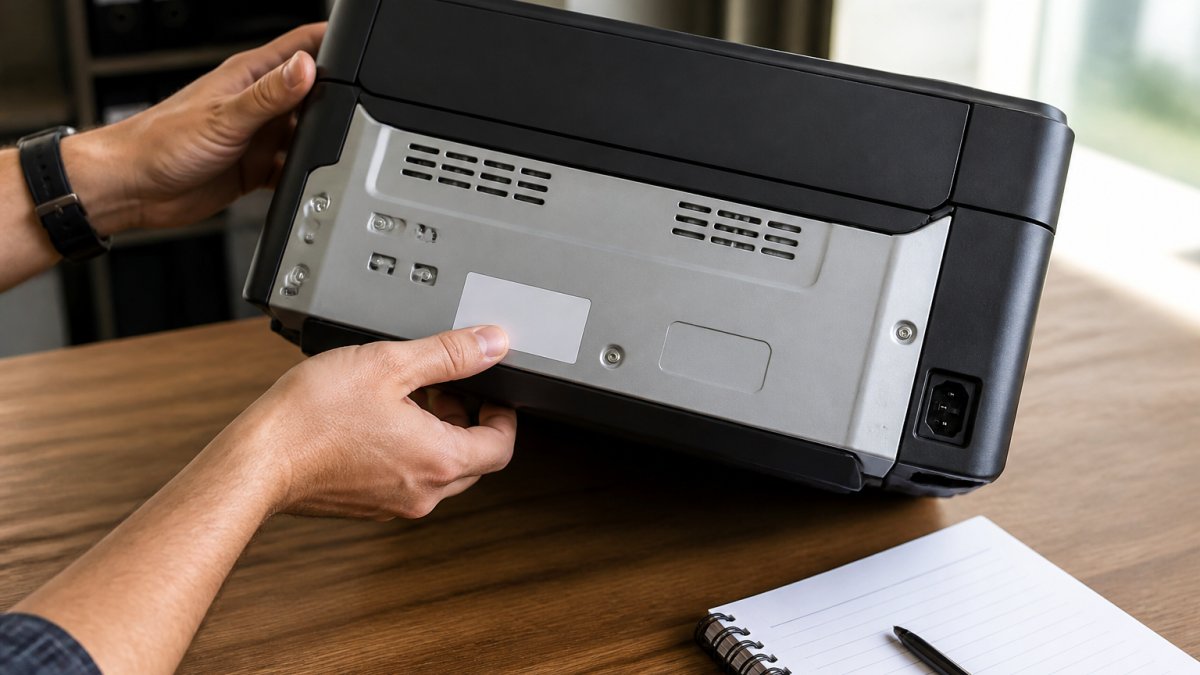
- The back of the printer, on a silver or white sticker
- Inside the front cover, once you open the toner door
- The printer control panel menu, usually under "System" or "Info"
- The manual or box, if you kept it
Write the full code down, including letters. An HP Laser 107w is not the same machine as an HP Laser 107a.
Toner vs Ink: Which Machine Are You Actually Refilling?
Not sure which you own? Check the cartridge.
- Laser printers use toner, a fine powder in a boxy, heavy cartridge.
- Inkjet printers use ink, a liquid in a small tank or cartridge.
A plastic box with a roller is toner; a small wet cartridge is ink. Buying toner for an inkjet is a common, expensive mistake.
How to Find the Toner Cartridge Number
The cartridge number appears in three places, and any one will do. The fastest route is the old cartridge you're replacing.
Reading the Old Cartridge and the Packaging
Look for a code on:
- The cartridge label, often near the handle or on the side
- The original box, if you still have it
- The printer's manual, in the supplies section
Common formats include numbers like 106A, 725, TN273, or SP311HE. Each one belongs to a specific printer family. For example, the HP support page on cartridge numbers explains how HP codes its cartridges, and Canon follows a similar pattern.
Checking Printer Toner Compatibility Before You Pay
Printer toner compatibility means the cartridge is built for your exact model, not just the same brand. A cartridge can look right, fit the slot, and still fail because the chip, internal geometry, or regional variant doesn't match. Most guides stop at "check the compatible-with list", that's not enough. Here's a workflow that removes the guesswork.
A Verified Five-Step Compatibility Workflow
Run this in order before you pay. Each step produces a piece of evidence you can hold the seller to.
- Capture the full model code, including suffix letters. An HP Laser 107w is not an HP Laser 107a, and a Canon i-SENSYS LBP223dw is not an LBP223dw II. The suffix often signals a regional build or firmware generation, and cartridge lists are keyed to it.
- Pull the official compatibility list from the maker's support page. Open the "Supplies" or "Consumables" page for your model; it lists the exact cartridge codes the firmware accepts. Save or screenshot it as your reference if a cartridge is rejected later.
- Cross-check the cartridge code against your old cartridge and the official list. If they disagree, trust the official list for your exact model suffix, the old cartridge may have been a compatible or another region's variant.
- Confirm the regional variant. Many cartridge families have region-specific codes. A cartridge built for another region can fit but be rejected by the chip or flagged by firmware, so ask the seller to confirm the variant matches your region.
- Verify the seller lists your exact model in writing. A "compatible with" line naming your full model code, not just the series, is the minimum. If it only says "fits HP Laser 107 series," ask for written confirmation of your suffix before ordering.
If a seller can't confirm compatibility in writing, don't buy. At Dabbous Mega Supplies, we confirm fit on request before an order ships.
Reading a Compatibility List Like a Technician
Official compatibility lists encode three things: the cartridge code, the printer models it fits, and sometimes the region or firmware generation. Read them in that order.
- Cartridge code first. Match the exact code (106A, 725, TN273, SP311HE). A near-match is not a match.
- Model suffix second. Confirm your suffix appears, not just the series name.
- Region or firmware note third. Read any note about regional variants or firmware before assuming a cheaper import will work.
A quick example: the Ricoh support documentation lists the SP 311 series as one family, but the SP311HE cartridge is the high-yield version. Standard and high-yield cartridges for the same printer are not interchangeable in price or page count, and the compatibility list is where that distinction is documented.

Firmware and Regional Restrictions: What's Documented and What's Myth
Firmware updates can change which cartridge chips a printer accepts, documented for some models, not a universal rule. Check the maker's support page for firmware notes before updating, and ask the seller whether the cartridge works with your current firmware. Regional variants are separate: a cartridge built for another market may fit but be rejected by the chip. Neither is a reason to avoid compatible toner, just buy from a seller who confirms variant and firmware fit in writing.
Original vs Compatible Toner: What You Give Up and What You Save
Original toner is made by the printer manufacturer. Compatible toner is made by a third party to fit the same printer. Both can work well.
Ricoh SP311HE Original Toner Cartridge – High Yield →

| Type | Made By | Cost | Best For |
|---|---|---|---|
| Original | Printer brand | Highest | Warranty-sensitive offices |
| Compatible | Third party | Lowest | High-volume, budget-tight teams |
| Remanufactured | Refilled original shell | Middle | Eco-minded buyers |
The honest trade-off: original cartridges give predictable output and full manufacturer warranty support.
For a concrete example, our HP #106A Original Laser Toner Cartridge suits compact HP Laser 107 and MFP 135 series printers, while compatible options for the same model cost far less.

Toner Cartridge Page Yield: Reading the Numbers Honestly
Toner cartridge page yield is the number of pages a cartridge prints before it runs out, measured at 5% coverage on A4 paper under a standardized test method. That baseline is why your real-world count often comes in lower, the box number is a best case, not a promise. Here's how to read it honestly and turn it into a real cost per page.
Why Your Real Yield Differs From the Box
Standardized yield figures assume a plain page with about 5% coverage, roughly a short letter or sparse document. Most offices print denser pages, and several factors move real yield up or down:
- Coverage. A dense text page or one with a logo can use two to three times the toner of the 5% test page.
- Document type. Forms, shaded invoices, and presentation handouts use more toner than plain correspondence.
- Print settings. Draft or toner-save modes stretch yield; high-quality or thick-paper modes reduce it.
Offices printing dense documents see yields noticeably below the box figure; light-duty users printing plain text come closer. Treat the box number as an upper bound and plan your reorder point accordingly.
Working Out Your Real Cost Per Page
Most offices print more than 5% coverage, so compare cartridges on cost per page, adjusted for your actual coverage.
To find your true cost per page:
- Divide the cartridge price by its stated page yield.
- Add delivery cost if ordering online.
- Adjust for coverage: if your pages are denser than the 5% test page, assume a lower real yield and recalculate.
- Add drum or maintenance cost if your printer uses a separate drum unit.
- Compare that figure across original, compatible, and high-yield options.
Example: a cartridge priced at 1,000,000 LBP with a 1,000-page yield costs 1,000 LBP per page at the standardized figure. A high-yield version at 1,600,000 LBP with a 2,000-page yield costs 800 LBP per page. The higher sticker price wins on value, provided you actually print enough to use it before it dries out or the printer is replaced.
Total Cost of Ownership Beyond the Cartridge Price
Cartridge price is only one line in the cost of printing. A realistic comparison includes:
- Drum replacement. Many laser printers use a separate drum unit with its own yield, often tens of thousands of pages. If yours separates toner and drum, include the drum cost in your cost-per-page math.
- Shipping and delivery. Online orders add delivery cost per cartridge; larger batches spread it.
- Waste and reprints. A rejected or leaking cartridge that prints streaky pages costs you the reprints, not just the cartridge.
Compare original, compatible, and high-yield options on total cost per page, not sticker price. A cheaper cartridge with a lower real yield can cost more per page than a high-yield original.
High-yield cartridges almost always beat standard-yield on cost per page, provided you actually print enough to use them before they dry out or the printer is replaced. If your volume is low, a standard-yield cartridge plus careful storage is the better value.
When Toner Gets Rejected or Prints Badly
A rejected cartridge or streaky page is usually fixable. Before blaming the cartridge, work through the basics.
- "Toner not recognized": reseat the cartridge, then check the chip contacts are clean.
- Faded or streaky prints: toner may be low, or the drum may need cleaning.
- Smudges down the page: often a dirty roller or damaged drum unit.
If a brand-new cartridge fails and the seller won't help, that's a red flag. Our team confirms compatibility before shipping and supports you after, which is why customers like Danny Ballan point to our support as the standout.
One more thing worth knowing: dispose of used cartridges responsibly. Many manufacturers run take-back programs, and reusing or recycling the plastic shell keeps waste out of landfill.
Conclusion
Choosing the right printer toner comes down to four checks: your model number, the cartridge code, confirmed compatibility, and real cost per page. Do those and you'll stop wasting money on cartridges that don't fit.
We stock original and compatible cartridges for the printers most offices run, backed by more than 70 years of supply experience and delivery across the country in 1-3 days. Get started with Dabbous Mega Supplies and keep your printers running without the guesswork.
Frequently Asked Questions
How do I find the right toner for my printer?
Find your printer's model number first, usually on a label on the back, base, or inside the front cover. Then match that model to a cartridge code using the manufacturer's compatibility list or the printer's control panel menu. Write the cartridge code down before you shop. A cartridge listed for the SP 310 series, for example, will not fit a Laser 107w. If the label is worn, your supplier can confirm the match from a photo of the model plate.
What is the difference between original and compatible toner?
Original toner is made by the printer manufacturer and carries their warranty. Compatible toner is built by a third party to fit the same cartridge code, usually at a much lower price. Original cartridges give you predictable page yield and no warranty risk. Compatible ones cost less per page but vary in quality between suppliers, so buy from a seller who will replace a cartridge that jams or leaks. For everyday black text in a busy office, a good compatible is often the better value.
How do I compare toner cartridge page yields?
Page yield is measured at 5% coverage on A4 paper, which is roughly a page of plain text. A cartridge rated at 1,000 pages will not last 1,000 pages of dense graphics. Compare the yield figure against the cartridge price to get cost per page, then adjust for how much you actually print. High-yield versions usually lower your cost per page, but only if you print enough to finish them before the cartridge sits unused for months.
How can I tell when my printer needs toner?
Fading text, grey streaks down the page, and a faint print on the first few sheets are the usual signs. Most laser printers also show a toner level warning on the control panel or in the driver software. Ignore the warning for a short while if print quality still looks fine, since some chips report low early. Replace the cartridge when output actually degrades, and keep one spare on hand so a mid-week print run does not stall.


