

Table of Contents
- Why Buying Toner in Bulk Pays Off for Lebanese Offices
- How Bulk Toner Cartridges Cut Your Cost Per Page
- Toner Shelf Life: How Long Cartridges Stay Usable
- Toner Cartridge Storage: Keeping Stock in Good Condition
- How to Avoid Overstocking Toner Without Running Out
- Checking Compatibility and Supplier Terms Before You Buy
- Frequently Asked Questions
Last Updated: October 7, 2026
Why Buying Toner in Bulk Pays Off for Lebanese Offices
Toner quietly drains an office budget, carton by carton. This guide from Dabbous Mega Supplies explains the benefits of buying toner in bulk for offices in Lebanon, and where bulk buying stops being smart and starts being a storage problem. We have supplied printing and office equipment across Lebanon since 1952. Bulk toner is not automatically cheaper, nor automatically a mistake, it depends on print volume, storage, and which cartridge your printer takes.
What Bulk Buying Actually Means for Your Budget
Bulk purchasing means ordering multiple toner cartridges in one transaction to secure a lower price per unit than buying one at a time. The appeal: fewer purchase orders, fewer delivery charges, and a stable unit price.
That matters more in Lebanon than in most markets. When supplier pricing shifts with import costs, a locked-in bulk order protects you from mid-quarter price increases on a consumable you cannot stop buying.
The trade-off: you convert a recurring small expense into a larger one-time payment and take on the storage and shelf-life risk yourself.
How Bulk Toner Cartridges Cut Your Cost Per Page
Cost per page is the only number that matters here. Divide the cartridge price by its page yield and you get the true cost of every document you print.
Here is how our own catalogue breaks down on that basis:
| Cartridge | Printer Series | Page Yield | Catalogue Price |
|---|---|---|---|
| HP 135A Original Black Toner | HP LaserJet M209, M211, MFP M234/M236 | 1,100 pages | $55.00 |
| HP 106A Original Black Toner | HP Laser 107, MFP 135/137 | 1,000 pages | $65.00 |
| Brother TN2260 & TN2280 Original Toner | HL-2240D, HL-2270DW, DCP-7065DN | 2,600 pages | LBP 42 |
| Kyocera TK1160 Original Toner | ECOSYS P 2040 DN, P 2040 DW | 7,200 pages | LBP 140 |
| Ricoh SP4500E Original Toner | SP 3600DN, SP 4510DN, SP 4510SF | 6,000 pages | $120.00 |
| Kyocera TK6305 Original Toner | TASKalfa 3500i-5501i, CS 3500i-5501i | 35,000 pages | LBP 170 |
The pattern is hard to miss. High-yield cartridges such as the Kyocera TK6305 or Konica TN912 are built for heavy print loads, while compact models like the HP 135A suit a desk printer running a few dozen pages a day.


A Simple Break-Even Calculation Before You Commit
Run this before any bulk order.
- Count your monthly print volume. Check the printer's page counter or your paper reams. A ream is roughly 500 sheets.
- Divide by your cartridge's page yield. 3,000 pages per month ÷ 1,000-page yield = 3 cartridges per month.
- Multiply by the bulk unit price to get your monthly consumable cost.
- Compare against your current single-unit price for the same cartridge.
- Divide the saving into the bulk order value. If you save $20 per cartridge and order 12, you save $240 per order cycle.
Toner Shelf Life: How Long Cartridges Stay Usable
Sealed, unopened toner cartridges generally stay usable for around two years when kept in their original packaging, away from heat and direct sunlight. That window shrinks once a cartridge is opened or installed. But "two years" is a rule of thumb, not a guarantee, the difference between a cartridge that prints cleanly at month 23 and one that streaks at month 18 usually comes down to storage conditions and the formulation inside.
What Actually Degrades Toner Over Time
Toner is a dry powder, plastic resin, pigment, and flow agents. Three things break it down:
- Heat softens the resin particles, causing them to clump. Clumped toner feeds unevenly and produces patchy fills or vertical streaks.
- Humidity introduces moisture that makes the powder stick to itself and to the cartridge's internal rollers. In coastal or humid climates, this is the more common failure mode than heat alone.
- Physical settling happens when a cartridge sits in one position for months. The powder compacts at the bottom of the hopper, and the first few hundred pages after installation may print light until the cartridge is shaken and redistributed.
Original equipment manufacturer (OEM) cartridges and compatible cartridges can age differently. If you are buying a year's supply of compatibles, store them carefully.
How to Test Whether Older Stock Is Still Good
Before installing a cartridge that has been on the shelf for more than 12-18 months, do a quick check:
- Shake test. Hold the cartridge level and rock it gently side to side for five seconds. A free-flowing rattle means the powder is still loose; a dull thud suggests clumping.
- Visual inspection. Open the packaging in a well-lit area. A fine, even dusting on the interior bag is normal. Visible clumps or a caked layer on the roller are warning signs.
- Test print. Install the cartridge and print a single-page diagnostic or text-heavy document. Look for even density, no vertical streaks, and no light bands. If the first page is light but the second is clean, the cartridge was simply settled, it is fine. If the second page is still streaky, the toner has degraded.
Sizing Your Bulk Order to the Shelf-Life Window
The practical rule: do not buy more toner than your office will use within 18 months. That gives you a six-month buffer inside the typical two-year window, absorbing slower-than-expected print months without pushing the last cartridges past their prime.
Here is how that math works for different print volumes:
| Monthly Print Volume | Cartridge Yield | Cartridges Used Per Month | Maximum Sensible Bulk Order (18 months) |
|---|---|---|---|
| 500 pages | 1,000 pages | 0.5 | 9 cartridges |
| 1,500 pages | 1,000 pages | 1.5 | 27 cartridges |
| 3,000 pages | 2,600 pages | ~1.2 | 21 cartridges |
| 10,000 pages | 7,200 pages | ~1.4 | 25 cartridges |
| 30,000 pages | 35,000 pages | ~0.9 | 16 cartridges |
High-yield cartridges change the picture. A single 35,000-page cartridge can cover more than a year of printing for a mid-size office, so a "bulk order" of three high-yield units may already be a two-year supply.
When Shelf Life Should Stop the Purchase
Two situations should override the discount:
- Your print volume is falling. If your office is digitizing records, moving to electronic signatures, or shifting to a managed print service, your monthly page count may drop 20-40% over the next year. A bulk order sized on last year's volume will outlive its usefulness.
- Your printer fleet is changing. A lease renewal or hardware refresh can retire the printer model your bulk order fits. Cartridges are model-specific, and leftover stock for a retired printer has no resale value.
If either applies, buy a smaller quantity at a slightly higher unit price. The savings from a larger order are erased the moment even two cartridges go unused.
Toner Cartridge Storage: Keeping Stock in Good Condition
Store toner upright, in the original sealed packaging, in a dry room with stable temperature and no direct sunlight.
A few practical rules:
- Keep cartridges upright, never stacked on their sides or face down
- Leave them sealed until the day you install them
- Store away from radiators, windows, and kitchen or kitchenette areas
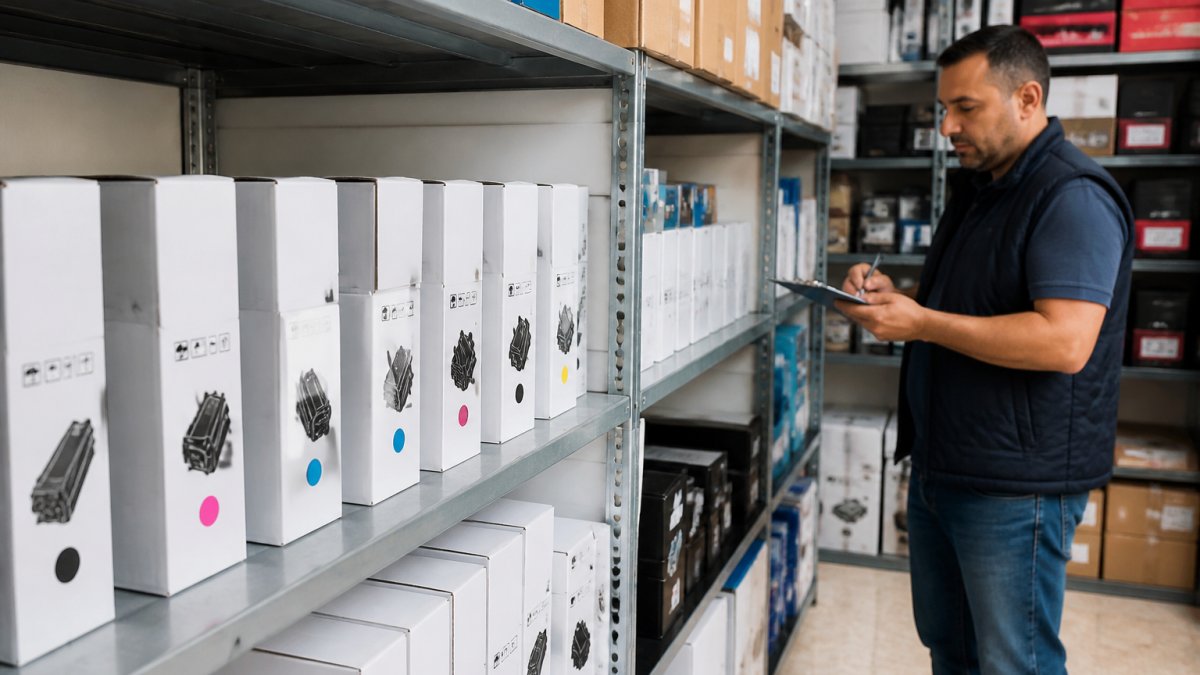
If storage space is the constraint, buy fewer high-yield cartridges instead of more standard ones.
How to Avoid Overstocking Toner Without Running Out
The fix is a reorder point, not a guess. Set a minimum stock level, then reorder when you hit it, not when the printer stops mid-document. A reorder point turns bulk buying into a planned cycle instead of a panic purchase.
Start with your monthly cartridge consumption. Keep one month of stock as a buffer, add your supplier's delivery window, and that total is your reorder point.
Matching Purchase Quantity to Print Volume
| Monthly Print Volume | Recommended Order | Reorder Point |
|---|---|---|
| Under 1,000 pages | 2-3 standard cartridges | 1 cartridge left |
| 1,000-5,000 pages | 1 high-yield cartridge | 2 weeks of stock |
| 5,000-15,000 pages | 3-6 high-yield cartridges | 1 month of stock |
| 15,000+ pages | Quarterly bulk order | 6 weeks of stock |
Checking Compatibility and Supplier Terms Before You Buy
Cartridge compatibility comes first. A bulk discount on the wrong cartridge is not a discount, it is dead stock. But "check the model number" is easier said than done when printers carry multiple identifiers and suppliers list cartridges under different naming conventions. Here are the exact steps to confirm compatibility, plus the supplier terms that determine whether a bulk order is safe to place.
A Model-by-Model Compatibility Checklist
Before ordering any quantity, confirm all five:
- Find the printer's exact model number. Look on the front or top of the printer for a label with a series name and a specific model code. An HP LaserJet MFP M234dw is not the same as an M234sdw, the cartridge may be shared, but the page yield and firmware can differ. Write down the full string, not just "HP LaserJet."
- Check the cartridge label inside the printer. Open the toner access door and read the label on the cartridge currently installed. It lists the OEM part number (for example, HP 135A, Brother TN-2260, Kyocera TK-1160). This is the ground truth.
- Match the OEM part number to the supplier listing. Do not rely on the printer name alone. A supplier may list a cartridge as compatible with "HP M209/M211/M234" while your specific model is M234sdw, confirm your model appears in the compatibility list.
- Verify the page yield. The same cartridge family often comes in standard and high-yield versions. HP 135A yields 1,100 pages; a high-yield variant may yield 2,400. In bulk, the yield determines how long your stock lasts and whether the unit price is actually lower per page.
- Check for regional or firmware variants. Some printers sold in different regions use different cartridge chips, and a firmware update can cause a compatible cartridge to be rejected. If you are buying compatibles, ask whether the cartridge is guaranteed to work with your printer's current firmware version.
Supplier Terms That Change the Risk of a Bulk Order
A bulk order shifts risk from the supplier to you: you pay upfront for stock you will consume over months. The supplier terms determine how much of that risk you carry. Ask for these five terms in writing before you commit:
- Return window on unopened cartridges. A 30-day return window is standard; 90 days is better. Ask whether returns are for credit or refund, and who pays return shipping.
- Damaged goods policy. Toner cartridges can be damaged in transit, crushed boxes, leaking powder, broken seals. Confirm the supplier replaces damaged units at no cost and covers shipping both ways.
- Warranty coverage and duration. OEM cartridges typically carry a warranty against defects for the life of the cartridge or a specified period. Compatible cartridges vary widely, some carry a one-year replacement warranty, others none. Get the duration and what triggers a claim in writing.
How to Compare Two Bulk Quotes Side by Side
When you have quotes from two suppliers, do not compare the headline unit price. Compare the total cost of the order including these four factors:
| Factor | Supplier A | Supplier B |
|---|---|---|
| Unit price × quantity | ||
| Delivery cost | ||
| Return window and restocking fee | ||
| Warranty duration and coverage |
A supplier with a 10% higher unit price but a 90-day return window and a one-year replacement warranty may be cheaper if even one cartridge fails. A supplier with the lowest unit price and no returns is the most expensive choice if the order is wrong.
Dabbous Mega Supplies has supplied offices, schools, NGOs, and resellers across Lebanon for more than 70 years, with delivery in 1-3 days and same-day options available. Browse original and compatible cartridges by printer model on our site, or ask our team to confirm the right part number before you commit to a bulk order.
Frequently Asked Questions
Is it cheaper to buy toner cartridges in bulk?
Yes, in most cases. Bulk orders spread shipping costs across more units and usually unlock wholesale pricing, so the price per cartridge drops. For example, the HP 106A Original Black Toner sells for around $65, while compatible options start near $9.50, and buying several at once pushes that cost per page down further. The savings only hold if you actually use the stock before it sits too long, so match your purchase quantity to real print volume.
Does toner expire or go bad in storage?
Toner does not have a hard expiry date like food, but its print quality changes over time. Most sealed cartridges perform well for roughly two years when kept cool, dry, and out of direct sunlight. Heat and humidity in Lebanon can shorten that window, so store cartridges upright in a shaded room. If you buy more than a year's supply, rotate older stock to the front so it gets used first.
How many toner cartridges should a small business keep in stock?
A practical rule is to hold one to two months of average usage as a buffer, plus one spare per active printer. Count how many pages your office prints monthly, divide that by the cartridge yield, and round up. A cartridge rated for 12,000 pages, like the Ricoh MP2014 Original Toner, lasts a long time in a small office, so you may only need one spare on the shelf.
What should businesses check before buying toner in bulk?
Confirm the exact printer model and cartridge number first, because a bulk discount is worthless if the cartridge does not fit. Check the page yield per cartridge so you can compare cost per page rather than sticker price. Then review supplier terms: delivery times across Lebanon, return policy, and whether wholesale pricing is locked or fluctuates. Dabbous Mega Supplies has served Lebanese offices since 1952, so support and stock continuity are not a gamble.


