

Table of Contents
- Why Printer Ink Leaks Happen (and How to Spot Them Early)
- How to Clean Ink Spills in Printer: A Step-by-Step Safety Guide
- Proper Storage for Inkjet Cartridges: Keep Them Sealed and Upright
- Preventative Maintenance for Printer Rollers and Nozzles
- How to Prevent Ink Leaks with Smart Printing Habits
- When to Replace a Cartridge and How to Dispose of It Responsibly
- Choosing the Right Cartridges and Supplies in Lebanon
- Conclusion
- Frequently Asked Questions
Last Updated: October 2, 2026
Why Printer Ink Leaks Happen (and How to Spot Them Early)
Knowing how to prevent printer ink leaks matters because they are messy, wasteful, and often a sign of a cartridge problem you can fix before it ruins your printer. At Dabbous Mega Supplies, we have supplied ink and toner across Lebanon since 1952. Learning how to prevent printer ink leaks starts with knowing the warning signs.
Common Causes of Ink Leakage
A failing vacuum seal is the number one culprit. Cartridges rely on a tight seal to hold ink inside the reservoir. Once that seal weakens, ink escapes.
Other frequent causes:
- Overfilling a refill kit past the fill line
- Clogged nozzles forcing pressure back into the cartridge
- Rough handling that cracks the plastic housing
- Heat exposure that thins the ink and raises internal pressure
- Old, expired cartridges with dried-out seals
Signs of a Faulty Ink Cartridge
Catch a bad cartridge before it leaks. Watch for these signals:
- Streaked or smudged pages with no clear print
- Ink pooling around the cartridge contacts
- A faint chemical smell near the carriage assembly
- Visible cracks or bulging on the cartridge body
- The printer reporting a cartridge error you cannot clear
How to Clean Ink Spills in Printer: A Step-by-Step Safety Guide
Cleaning an ink spill safely takes about 15 minutes and a few basic supplies. The key is to work carefully and never let ink spread into the printer's electronics.
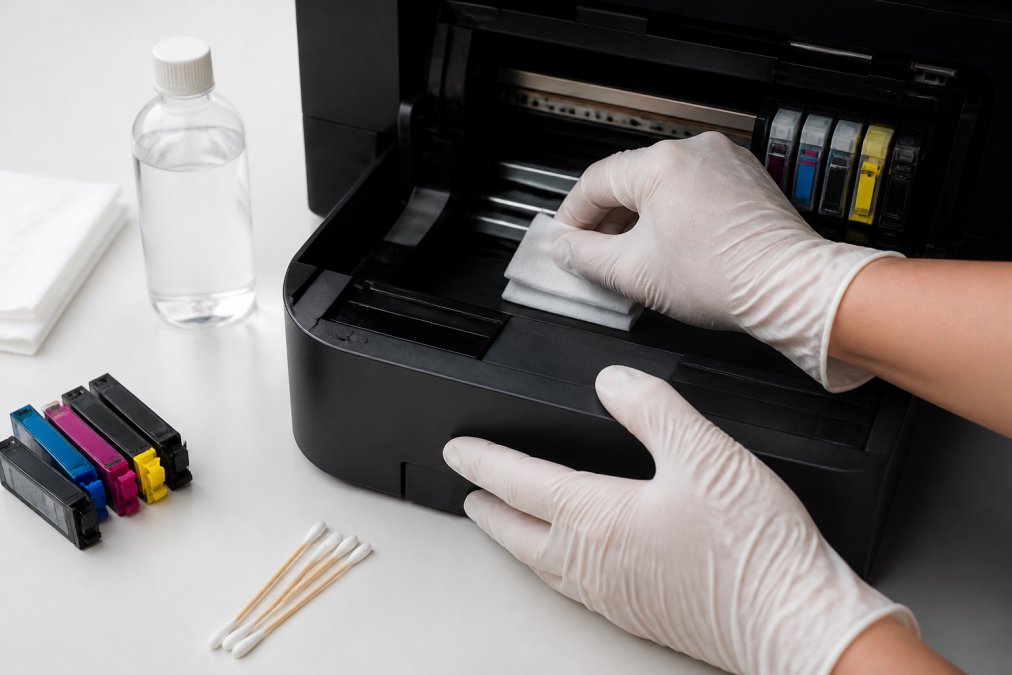
What you'll need:
- Disposable gloves
- Lint-free cloths
- Isopropyl alcohol (70% or higher)
- Cotton swabs
- A plastic bag for waste
Steps:
- Unplug the printer and remove the cartridge.
- Put on gloves. Ink stains skin and clothing fast.
- Blot the spill with a dry lint-free cloth. Do not rub.
- Dampen a fresh cloth with isopropyl alcohol and wipe gently.
- Use cotton swabs for tight spots near the carriage assembly.
- Let everything dry fully before reinstalling the cartridge.
- Seal the used cloths in a plastic bag and bin them.
Proper Storage for Inkjet Cartridges: Keep Them Sealed and Upright
Proper storage for inkjet cartridges means keeping them sealed, upright, and cool. Store cartridges in their original packaging with the protective tape in place until you are ready to use them.
Follow these storage rules:
- Keep cartridges upright, never on their side
- Leave the protective tape on until installation
- Store at room temperature, away from direct sun
- Avoid humid rooms like kitchens and bathrooms
- Use cartridges before their expiry date
The Infrequent-Printer Problem (and Why It Causes Most Leaks)
If you print less than once a week, you are the highest-risk user for an ink leak, and most guides never tell you why. Here is the mechanism:
- Ink sitting in the printhead nozzles begins to dry and thicken.
- The dried ink partially blocks the nozzles.
- The next time you print, the printer pushes harder to clear the blockage.
- That extra pressure can force ink past the cartridge seal or out of the nozzle plate, a leak.
- The printer then runs a heavy cleaning cycle, dumping waste ink into the maintenance box or pad, which can overflow if it is already saturated.
A Long-Term Storage Protocol for Infrequent Printers
If you know you will not print for a month or more, follow this protocol:

- Print a nozzle check page once a week. It uses very little ink and keeps the nozzles wet. Set a calendar reminder.
- Leave the cartridge installed if the printer will be used within a month. Removing it exposes the nozzles to air and dries them faster.
- For storage longer than a month, remove the cartridge, replace the protective tape or clip, seal it in an airtight zip bag with a desiccant packet, and store it upright in a cool drawer.
- Never store a cartridge in the fridge. Condensation forms inside the bag and contaminates the ink.
- Run a cleaning cycle before a long print job, not after. Cleaning after a job wastes ink and leaves the nozzles wet with nothing to do.
- Check the maintenance box or pad before and after any long idle period. A saturated pad is the number one hidden cause of ink pooling under the printer.
Rotation and Bulk Buying
If you buy in bulk, rotate your stock. Use the oldest cartridges first so nothing sits long enough for the seals to dry out. Write the purchase date on each box with a marker, most cartridges have a shelf life of about two years, and seals degrade faster in humid climates like Lebanon's coastal summer.
Preventative Maintenance for Printer Rollers and Nozzles
Preventative maintenance keeps ink flowing where it should and stops leaks before they start. But the right maintenance depends on which printer technology you own. An inkjet cartridge, a laser toner cartridge, and an EcoTank-style tank system each leak for different reasons, and treating them the same is how people accidentally make things worse.
Inkjet Printers: The Printhead Is the Pressure Point
Inkjet cartridges hold ink under slight negative pressure. When the printhead clogs, that pressure balance shifts and ink can weep from the nozzle plate or the cartridge seal. Run your printer's built-in cleaning cycle every two to four weeks, even if you print often.
If the cycle fails:
EPSON ORIGINAL INK #101/ MAINTENANCE →
- Remove the cartridge and set it on a lint-free cloth
- Gently wipe the nozzle plate with a cloth dampened in isopropyl alcohol
- Never touch the nozzle plate with bare fingers
- Let it dry, then run a test page
Laser Printers: Toner Is Not Ink
Laser printers do not leak liquid ink. What people call a "laser leak" is usually toner dust escaping from a worn drum unit, a cracked toner cartridge, or an overfilled waste-toner reservoir. Toner is a fine plastic powder, and it behaves completely differently from ink.
- Never use isopropyl alcohol on toner, it smears the powder into the plastic
- Use a dry lint-free cloth or a toner-safe vacuum, never a household vacuum
- Replace the drum unit when you see repeated ghosting or a dust trail on the page
- Check the waste-toner bottle on office-class lasers and empty it per the manual
EcoTank and MegaTank Systems: Watch the Reservoir and Maintenance Box
Tank-based printers from Epson (EcoTank) and Canon (MegaTank) hold ink in refillable reservoirs rather than cartridges. Their leak risks are different:
- Overfilling the tank past the fill line pushes ink into the air vent and out the seams
- A saturated maintenance box is the most common cause of ink pooling under the printer, the box absorbs waste ink from cleaning cycles and must be replaced when full
- Loose tank caps let air in and ink seep out during transport
- Tilting the printer during a move sends ink through the tubes and into the maintenance box faster than it can drain
Rollers and Paper Feed (All Printer Types)
Dirty rollers cause jams, and jams can knock a cartridge or drum unit loose. Wipe rollers with a dry lint-free cloth every month. Check the paper feed for dust and torn paper bits. A clean paper path means fewer jams and less stress on the carriage assembly.
Before any maintenance, note your printer model. The cleaning menu, maintenance box location, and safe cleaning chemicals differ between inkjet, laser, and tank systems, and using the wrong method can void your warranty.
How to Prevent Ink Leaks with Smart Printing Habits
Smart printing habits cut leaks more than any single fix. Print a small page at least once a week to keep nozzles wet and ink moving.
Habits that protect your printer:
- Print something weekly to avoid clogged nozzles
- Use the correct print density setting for your paper
- Do not yank cartridges out mid-print
- Let the printer finish its maintenance cycle
- Keep paper dry and flat to reduce jams
A printer that sits unused for months is the most likely to leak. Weekly use is the cheapest maintenance you can do.
When to Replace a Cartridge and How to Dispose of It Responsibly
Replace a cartridge when print quality drops, the cartridge leaks, or the expiry date has passed. Do not wait for a total failure.
Signs it is time to swap:
- Faded or streaky prints after a cleaning cycle
- Visible ink around the cartridge body
- The printer refuses to recognize the cartridge
- The cartridge is past its expiry date
Choosing the Right Cartridges and Supplies in Lebanon
The right cartridge prevents most leaks before they start. Genuine and quality compatible cartridges hold their seals far better than cheap knock-offs.
Here is how the main options compare:
| Cartridge Type | Leak Risk | Best For | Notes |
|---|---|---|---|
| Original (OEM) | Low | Daily office printing | Tightest seals, highest cost |
| Quality compatible | Low-Medium | High-volume, budget-focused | Check the supplier's warranty |
| Refill kits | High | Occasional home use | Easy to overfill |
Conclusion
A leaking printer is frustrating, but it is almost always preventable. Store cartridges upright, clean your printhead, print weekly, and replace worn cartridges before they fail.
Frequently Asked Questions
What should I do if my HP printer's ink cartridge is leaking?
Remove the leaking cartridge immediately and place it on a paper towel, sealed side down. Put on disposable gloves before touching any ink. Wipe the carriage assembly and surrounding area with a lint-free cloth slightly dampened with isopropyl alcohol. Inspect the cartridge for cracks or a damaged seal. If the leak continues, replace the cartridge. For HP models like the DJZ6200, a new printhead and maintenance cartridge may be needed if ink has reached internal components.
How long will ink last in a printer before it dries up?
Unopened inkjet cartridges typically last 18 to 24 months from the manufacturing date when stored in a stable environment away from direct sunlight and heat. Once installed, ink can begin to dry in the printhead within 4 to 8 weeks of inactivity, leading to clogged nozzles and potential leaks. Print at least a small test page every week or two to keep the ink flowing and the printhead clear.
Can a leaking ink cartridge damage my printer permanently?
Yes, if left unchecked. Ink that reaches the carriage assembly, printer rollers, or internal circuit boards can cause corrosion, electrical shorts, and permanent mechanical failure. The ink waste pad can also become saturated, leading to overflow. Cleaning spills promptly and replacing faulty cartridges early prevents most permanent damage. If ink has already reached internal electronics, professional servicing is usually required.
How do I clean ink spills inside my printer safely?
Unplug the printer first. Wear disposable gloves to avoid skin contact. Remove the cartridge and set it aside on a paper towel. Use a lint-free cloth dampened with isopropyl alcohol to gently wipe the carriage assembly, rollers, and any visible ink residue. Avoid pouring liquid directly into the printer. For hard-to-reach areas, use cotton swabs. Let all surfaces dry completely before reinstalling the cartridge and powering the printer back on.


