
Table of Contents
- Why Verifying Original HP Ink Cartridges Matters
- Step 1: Inspect the Packaging and Security Features
- Step 2: Verify the Serial Number and Product Code
- Step 3: Use the QR Code for Authentication
- Step 4: Check for Physical Cartridge Defects
- Understanding the Risks of Using Fake Printer Ink
- Where to Buy Original HP Ink in Lebanon
- Troubleshooting HP Cartridge Not Recognized Errors
- Frequently Asked Questions
Last Updated: September 30, 2026
Why Verifying Original HP Ink Cartridges Matters
Counterfeit printer ink is a serious problem in Lebanon and across the region. Fake cartridges can damage your printer, produce poor-quality prints, and waste money. Learning how to verify original HP ink cartridges protects your equipment and saves you from costly repairs.

At Dabbous Mega Supplies, we help customers identify genuine products. It comes down to checking a few key details on the cartridge and its packaging.
Why does this matter? Fake ink often contains incorrect chemical formulations. It can clog printer nozzles, void your warranty, and create expensive downtime for your business. Original HP cartridges are engineered to work with your specific printer model. They deliver consistent color, sharp text, and reliable performance.
This guide walks you through the exact steps to verify original HP ink cartridges before you buy or use them.
Step 1: Inspect the Packaging and Security Features
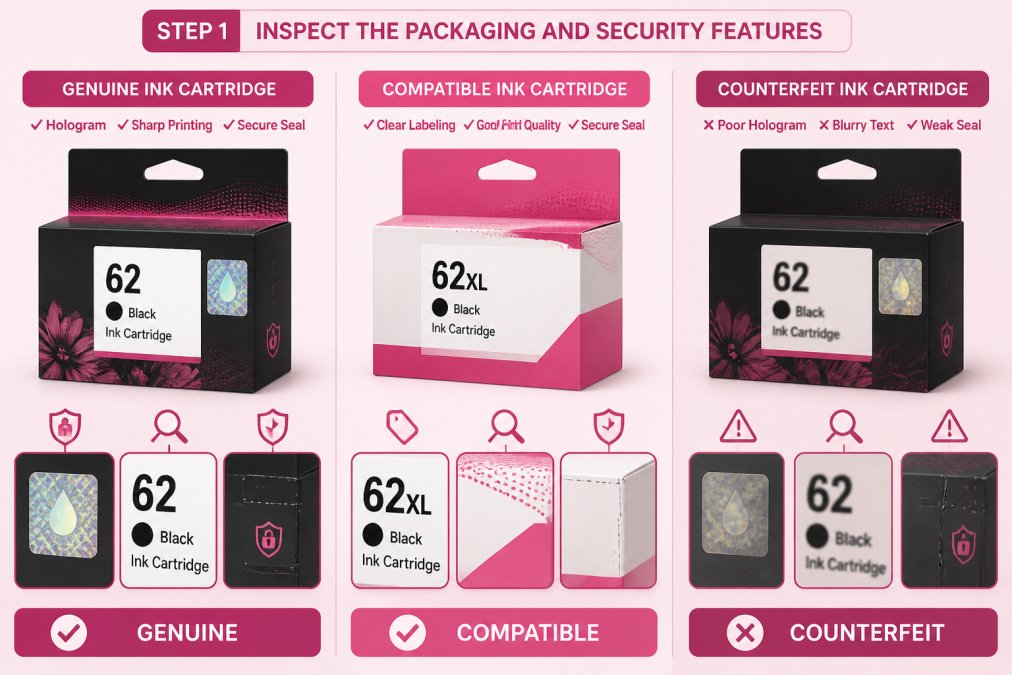
The packaging tells you a lot about whether an ink cartridge is genuine. However, it's important to understand that "non-original" does not always mean "counterfeit." There are three distinct categories:

- Genuine Original HP: Manufactured by HP, sealed in official HP packaging, with full warranty coverage.
- Remanufactured or Third-Party Compatible: Legally produced by licensed manufacturers or refurbished by authorized vendors. These are not counterfeit, but they are not original HP products. They typically carry their own warranty.
- Counterfeit: Illegally produced imitations designed to deceive consumers into thinking they are genuine HP products. These carry no warranty and pose real risks.
Understanding this distinction helps you make informed purchasing decisions. Many users panic when they see "non-original" and assume they've purchased a fake. In reality, a remanufactured cartridge from a reputable vendor is a legitimate alternative to genuine HP ink.
Check for tamper-proof seals and holograms
Real HP cartridges come with a security hologram on the box. This hologram should show the HP logo and change color when you tilt it. Run your finger over it. It should feel slightly raised, not flat. Counterfeit holograms are often flat, poorly printed, or do not shift color convincingly.
Look for a tamper-proof seal on the box. This is usually a sticker or plastic band that covers the opening. If the seal is broken or missing, the cartridge may be refurbished, used, or counterfeit. Genuine HP cartridges are sealed at the factory. If you're buying from an authorized retailer, a broken seal is a red flag.
Genuine HP packaging uses high-quality printing. The text should be sharp and clear. Colors should match the official HP design. If the box looks faded, blurry, or has spelling errors, it's a red flag for counterfeits. Compare the packaging against official images on HP's website to spot inconsistencies.
Examine print quality on the box
Check the text on the packaging carefully. Counterfeit boxes often have:
- Misspelled words or poor grammar (e.g., "Cartrige" instead of "Cartridge")
- Blurry or pixelated text, especially on fine details like model numbers
- Colors that don't match HP's official branding (off-shade blues, reds, or grays)
- Uneven printing or ink smudges
- Inconsistent font sizes or weights
Real HP packaging uses professional printing standards. Every detail should look polished and professional. The product code should be legible and match HP's standard format for that cartridge model.
If you're unsure, photograph the packaging and compare it side-by-side with an image from HP's official product page or from a cartridge you know is genuine. Small details, like the thickness of lines in the HP logo or the exact shade of the background, are often where counterfeits fail.
Step 2: Verify the Serial Number and Product Code
Every genuine HP cartridge has a unique serial number. This number helps you confirm the cartridge is authentic and can be verified through HP's official systems.
How to find and verify the serial number
Find the serial number on the cartridge itself or on the box. It's usually printed on a label on the back or side of the cartridge. The format varies by cartridge model, but it should be clear and easy to read.
Visit HP's official website and navigate to their cartridge authentication page (usually found under Support > Verify Genuine Products). Enter your cartridge's serial number in the verification tool. Genuine HP cartridges will return a confirmation page with the cartridge model, manufacturing date, and authenticity status.
What to expect from a genuine result:
- The page confirms the cartridge model matches what you're holding
- It displays the manufacturing date (typically within the last 2-3 years for current stock)
- It shows "Genuine HP Product" or similar confirmation language
- The page is on an official HP domain (hp.com or a regional equivalent)
Red flags:
- The serial number is not found in HP's database
- The page shows a different cartridge model than what you're holding
- The verification redirects to a third-party website or requires you to enter payment information
- The page displays an error or "Product Not Found" message
If the number doesn't match any HP records, the cartridge is likely counterfeit or the serial number has been fraudulently duplicated.
Understanding product codes vs. serial numbers
The product code is different from the serial number. It identifies the cartridge type and capacity (like HP 953XL, HP 963, or HP 932XL). This code should match your printer model. Check your printer's manual or visit HP's website to confirm which cartridge codes work with your specific machine.

Counterfeit cartridges sometimes use incorrect product codes. They may claim to fit your printer but actually be designed for a different model. This mismatch will cause errors when you try to use them.
HP 953XL Original Ink Cartridge (XL →
You can verify the correct product code by:
- Checking your printer's manual or specifications sheet
- Looking at the cartridge slot inside your printer (the correct codes are often labeled)
- Visiting HP's website and entering your printer model number
- Calling HP support or your authorized retailer
If a seller claims a cartridge will work with your printer but the product code doesn't match HP's official compatibility list, do not purchase it.
Step 3: Use the QR Code for Authentication
Many genuine HP cartridges include a QR code on the packaging or the cartridge itself. This QR code links directly to HP's authentication system.
Scan the QR code with your smartphone camera or a QR code reader app. A real HP cartridge will direct you to HP's official website or an authentication page. The page should confirm the cartridge is genuine.
If the QR code doesn't work or takes you to an unfamiliar website, the cartridge is likely fake. Counterfeiters sometimes add fake QR codes that look real but lead nowhere.
Some older HP cartridges may not have a QR code. This doesn't automatically mean they're fake. But if a newer cartridge lacks a QR code, that's suspicious.
Step 4: Check for Physical Cartridge Defects
The cartridge itself should look clean and well-made. Genuine HP cartridges are manufactured to strict quality standards.
Look for ink smudges, leakage, and damage
Inspect the cartridge for any visible ink leaks. Genuine cartridges are sealed properly. Ink should not be leaking from the nozzles or sides.
Check for ink smudges on the outside of the cartridge. A little dust is normal, but heavy smudging or staining suggests poor manufacturing or storage. Counterfeit cartridges often have sloppy assembly.
Look for cracks, dents, or warped plastic.
Understanding the Risks of Using Fake Printer Ink
Fake ink cartridges pose real risks to your printer and your budget. Understanding these dangers helps you make smarter purchasing decisions.
Where to Buy Original HP Ink in Lebanon
Buying from the right supplier is your best defense against counterfeit cartridges. Authorized retailers have quality controls in place.
When you buy from Dabbous Mega Supplies, you get:
- Genuine HP cartridges verified for authenticity
- Competitive pricing with no hidden fees
- Fast delivery anywhere in Lebanon (1-3 days, same-day options available)
- Professional customer support if you have questions
Troubleshooting HP Cartridge Not Recognized Errors
Sometimes your printer displays an error message even when you've installed a genuine cartridge. Understanding what these messages mean helps you fix the problem.
What causes cartridge not recognized messages
Your printer's control panel may show "cartridge not recognized" or "incompatible cartridge detected." This error has several possible causes.
How to resolve the error
Start by removing the cartridge and inspecting the metal contacts. Use a clean, dry cloth to gently wipe the contacts. Do the same for the cartridge slot inside your printer. Remove any dust or dried ink.
Frequently Asked Questions
How can I verify the authenticity of an HP cartridge?
Check for security labels and holograms on the packaging, inspect the serial number on the cartridge itself, and scan the QR code on the box to authenticate it directly with HP. Examine the physical cartridge for ink smudges, leakage, or damage. Original HP cartridges have crisp printing on the packaging and secure seals. If any verification step fails, the cartridge is likely counterfeit.
What are the risks of using fake printer ink?
Counterfeit cartridges can damage your printer hardware, void your warranty, and produce poor-quality output with ink smudges and color inaccuracy. Fake ink may leak inside your printer, cause cartridge not recognized errors, and cost more in repairs than genuine cartridges save.
Where can I buy original HP ink in Lebanon?
Purchase from authorized dealers like Dabbous Mega Supplies, which has served Lebanon since 1952. We offer a full range of original HP cartridges including HP 953XL, HP 963, HP 950 & 951, and HP 932XL & 933XL with fast delivery across Lebanon.
How do I resolve a cartridge not recognized error?
First, verify the cartridge is genuine using the steps in this guide. Remove and reinstall the cartridge, clean the printer's cartridge contacts with a dry cloth, and check your printer's control panel for firmware updates. If the error persists with a genuine cartridge, contact HP support or your retailer.
Verifying original HP ink cartridges takes just a few minutes but saves you money and frustration. Counterfeit ink damages printers and produces poor results. When you buy from Dabbous Mega Supplies, you get genuine HP cartridges backed by over 70 years of reliability in Lebanon. Shop our full selection of original ink cartridges today and print with confidence.


