

Table of Contents
- Why Buying Computer Accessories Online Is Safe When You Know What to Check
- New vs. Used Components: What to Choose
- How to Spot Counterfeit Computer Accessories
- Safe Payment Methods for Online Shopping
- Benefits of Buying from Authorized Tech Distributors
- Identifying Reputable Online Retailers and Checking Seller Reputation
- Buyer Protection, Return Policies, and Warranty Coverage
- Frequently Asked Questions
Last Updated: September 25, 2026
Why Buying Computer Accessories Online Is Safe When You Know What to Check
Buying computer accessories online safely comes down to four checks: verified seller, secure payment, clear warranty terms, and a documented unboxing. Do those consistently and online purchasing is often safer than a cash deal at a local shop, because you get a receipt, a tracking number, and a legal right to return.
New vs. Used Components: What to Choose
New components come with a full manufacturer warranty and known history. Used and refurbished parts cost less but carry shorter or no coverage, and their condition depends on how the previous owner treated them.
| Factor | New | Refurbished | Used |
|---|---|---|---|
| Warranty | Full manufacturer | 3-12 months, seller-backed | Usually none |
| Price | Highest | 20-40% lower | Lowest |
| Risk of failure | Lowest | Low if graded | Unpredictable |
| Best for | Printers, PSUs, daily-use gear | Spare monitors, docks | Test benches, temporary setups |
How to Spot Counterfeit Computer Accessories
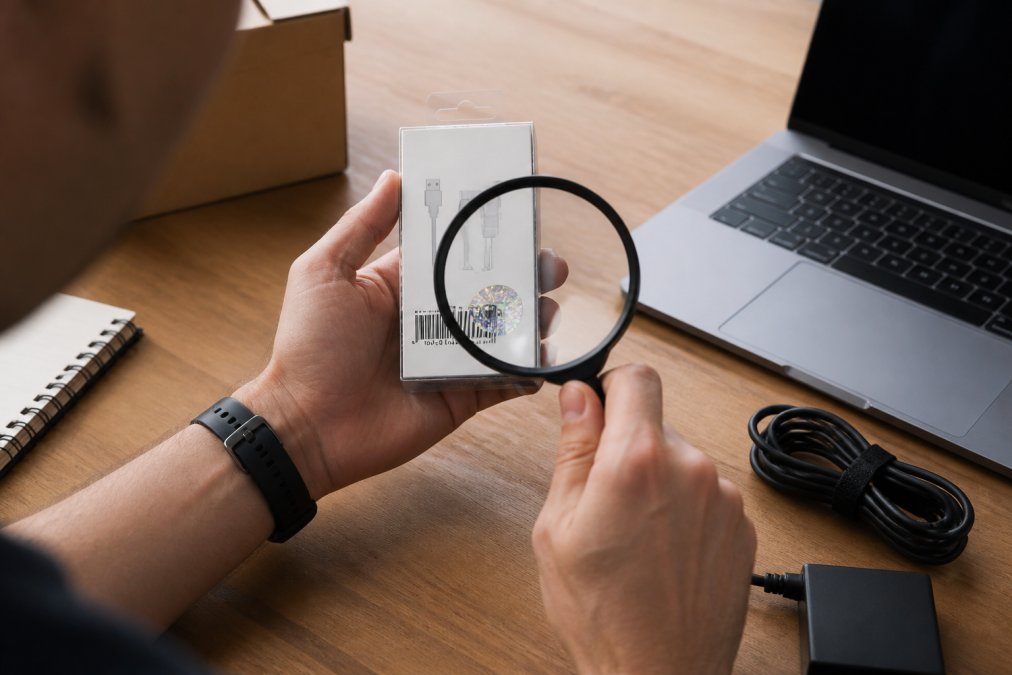
Counterfeit accessories are detected through packaging, serial numbers, and build quality. Genuine manufacturers print sharp labels, use consistent fonts, and give every unit a unique serial number you can verify directly. But spotting a fake before you buy is only half the battle, proving it after the package arrives requires a protocol.
Pre-Purchase Checks
Check these before you buy:
- Price too good. If a genuine-brand cartridge or hub is half the normal price, assume it is fake until proven otherwise.
- Vague listings. No model number, no part number, stock photos only.
- Seller cannot confirm authenticity. Ask directly. Reputable sellers answer without hesitation.
- Packaging tells. Misspelled brand names, blurry holograms, and flimsy boxes are reliable warning signs.
- Serial number verification. Contact the manufacturer or check their official verification tool. This is the step most buyers skip.
For ink and toner, counterfeit cartridges are a serious problem in the region. The tell is usually print quality that degrades within a few hundred pages, plus leaking that damages the printer itself.
Cryptographic Verification: The Step Most Buyers Miss
Many manufacturers now embed cryptographic signatures or unique serial numbers verifiable online. Some printer cartridge makers provide a portal where you enter the serial number and it confirms whether the unit is genuine and whether it has been reported stolen. This also helps you avoid buying stolen goods, which can leave you with no warranty and potential legal issues.
How to verify:
- Locate the serial number on the product or packaging, often a long alphanumeric string, sometimes under a scratch-off panel.
- Go to the manufacturer's official verification page (search "[brand] verify serial number").
- Enter the serial number. The system confirms if it is valid, and sometimes the region and warranty status.
- If the serial is invalid or already registered to someone else, do not proceed. Contact the seller immediately.
Unboxing and Testing Protocol: Your Evidence Trail
If you receive a suspicious item, your refund or replacement depends on the evidence you collect. Follow this protocol for any high-value or high-risk purchase:
- Film the unboxing. Start with the sealed package, show the shipping label, then open it on camera without cuts. This proves the item you received matches what was shipped.
- Photograph the serial numbers. Take one clear photo of the serial number on the device and on the box together. This links the item to the packaging.
- Test immediately. Plug it in, run it, and confirm it works within the return window, not when you need it.
- Document any defects. If it fails, take photos and video of the failure, and note the date and time.
- Report in writing. Contact the seller the same day with your evidence, and keep a copy of all communication.
Regional Consumer Rights and International Purchases
If you buy from an international seller, your local consumer protection laws may not apply. Cross-border disputes are governed by the marketplace's policies and the seller's terms, which often favor the seller. Before buying, check:
- Does the marketplace offer buyer protection for international orders?
- What is the return shipping cost if the item is defective?
- Is the warranty valid in your country?
How to verify a printer cartridge serial number
Consumer protection for online purchases in Lebanon
Safe Payment Methods for Online Shopping
Safe payment methods for online shopping are those that create a traceable record and let you dispute a charge. Credit cards, established payment gateways, and cash on delivery all qualify. Bank transfers to unknown sellers do not. For computer accessories, especially high-value items like GPUs, printers, or bulk toner orders, the payment method can mean the difference between a quick refund and a total loss.

The Core Protection Spectrum
Ranked by how much recourse you have if something goes wrong:
- Credit card (including virtual cards), chargeback rights if goods never arrive or are not as described. Virtual cards add a layer of security by masking your real card number.
- Reputable payment gateway (e.g., PayPal, Stripe), encrypted checkout, dispute resolution, and a digital receipt. Buyer protection policies vary, so read the terms for high-value items.
- Cash on delivery, you inspect before paying, but you lose chargeback rights. Best for low-value, low-risk items where inspection is easy.
- Bank transfer, almost no recourse. Avoid with unfamiliar sellers, especially for expensive components.
Virtual Credit Cards: Disposable Protection for One-Time Buys
Virtual credit cards (VCCs) are single-use or merchant-locked card numbers issued by your bank or a fintech service. They are ideal for a new or unfamiliar retailer because the number cannot be reused if the merchant is breached, and most let you set a spending limit. The trade-off: some merchants reject VCCs, and chargeback rights may be weaker than with a traditional credit card.
USB HUBS 4in1/5in1/5in1-multi →
Digital Wallets: Convenience with Conditional Protection
Digital wallets like Apple Pay, Google Pay, and PayPal add tokenization, your actual card number is not shared with the merchant, which reduces card-skimming risk. But the dispute process depends on the wallet provider and funding source: a PayPal balance transaction may have different buyer protection than one funded by a credit card. For high-value hardware, fund the wallet with a credit card to retain chargeback rights.
Escrow Services: The Safest Option for High-Value Hardware
Escrow services hold your payment until you confirm the item is as described, releasing funds only after you inspect the goods. They are common in B2B transactions and professional marketplaces, and are the gold standard for used or refurbished components from an unknown seller. The downside is cost (typically a percentage of the transaction) and slower processing, but for a $500+ order the fee is often worth the peace of mind.
A Decision Framework for Computer Accessories
- Under $50, reputable retailer: Credit card or digital wallet. Speed and convenience matter more.
- Under $50, unknown seller: Virtual credit card or cash on delivery. Limit your exposure.
- $50-$500, any seller: Credit card (for chargeback) or escrow if the seller is new.
- Over $500, any seller: Escrow or credit card with a documented dispute process. Never use bank transfer.
Two Habits That Matter More Than the Method
How to set up a virtual credit card with your bank
Understanding PayPal buyer protection for high-value items
Benefits of Buying from Authorized Tech Distributors
Authorized tech distributors give you three things informal sellers cannot: genuine stock, manufacturer warranty coverage, and a business you can hold accountable. That last point matters most.
Identifying Reputable Online Retailers and Checking Seller Reputation
A reputable online retailer has a verifiable physical presence, a published return policy, and reviews going back more than a year. Those three signals filter out most of the risk before you spend anything.
How to check a seller in five minutes:
- Search the business name plus "reviews" and read the negative ones first
- Confirm a real address and phone number, not just a contact form
- Read the return policy and find the actual return window
- Check how long the domain and social pages have existed
- Ask a pre-sales question and note how fast and how clearly they reply
Buyer Protection, Return Policies, and Warranty Coverage
Practical rules that save arguments:
- Open the box within the return window. Most policies start counting from delivery, not from when you get around to testing.
- Keep the packaging. Many returns are refused without the original box and inserts.
- Keep the digital receipt. Screenshot the order confirmation and the tracking page.
- Report dead-on-arrival items immediately. Same day, in writing, with photos.
- Test before the window closes. Plug it in, run it, confirm it works.
For accessories like hubs, converters, and cables, warranty periods are short, so the practical protection is the return window. Test them the day they arrive, not the week you need them.
Frequently Asked Questions
How can I verify if a computer accessory is original or counterfeit?
Check the serial number on the manufacturer's website, look for holographic seals and spelling errors on packaging, and compare the weight and finish to genuine products. Buying from authorized distributors like Dabbous Mega Supplies eliminates the guesswork. Genuine accessories come with proper warranty documentation and clear labeling. If the price is significantly lower than retail, treat it as a warning sign.
What payment methods are safest when buying tech online?
Use credit cards or trusted payment gateways that offer buyer protection and dispute resolution. Avoid direct bank transfers to unknown sellers. Look for secure checkout with SSL encryption and two-factor authentication. In Lebanon, cash on delivery is common for local orders. Keep digital receipts for every transaction so you can file a claim if something goes wrong.
Is it safer to buy computer accessories from local retailers or international sites?
Local retailers in Lebanon offer faster delivery, easier returns, and warranty support you can actually reach. International sites may have lower prices but come with shipping delays, customs fees, and complicated warranty claims. For everyday items like USB hubs, cables, and converters, local suppliers like Dabbous Mega Supplies provide reliable products with nationwide delivery in 1-3 days.
How do I handle warranty claims for computer accessories bought online?
Keep your digital receipt, original packaging, and any warranty cards. Contact the seller first, then the manufacturer if needed. Authorized distributors handle claims directly, which saves you time. Dabbous Mega Supplies has been serving Lebanon since 1952 and provides after-sales support for products purchased through their store. Register your product online if the manufacturer offers it.


