
Table of Contents
- Why Verifying Original Printer Cartridges Matters for Lebanese Businesses
- OEM vs Compatible Ink Cartridges: What's the Real Difference?
- Step-by-Step: How to Verify Original Printer Cartridges
- Risks of Counterfeit Printer Toner: What You're Really Saving
- Troubleshooting Printer Cartridge Recognition Issues
- Where to Buy Genuine Printer Supplies in Lebanon
- Conclusion: Protect Your Printer and Your Budget
- Frequently Asked Questions
Last Updated: September 20, 2026
Why Verifying Original Printer Cartridges Matters for Lebanese Businesses
A counterfeit cartridge can cost you far more than the money you thought you saved. It can leak toner inside the machine, clog the printhead, and void your printer's warranty. For a busy office in Beirut or Tripoli, one failed cartridge means lost work hours and a repair bill that dwarfs the original purchase.
That's why knowing how to verify original printer cartridges is a basic skill for any office manager.
OEM vs Compatible Ink Cartridges: What's the Real Difference?
An OEM cartridge is made by the printer's manufacturer, such as HP, Canon, Brother, or Samsung. A compatible cartridge is made by a third party to fit the same printer. Both are legal. Only one of them is a counterfeit, and that's the one you need to avoid.
Here's the distinction that matters:
- OEM (original equipment manufacturer): Built by the printer brand, sold under its name, guaranteed to work with your model.
- Compatible: Built by a third-party maker, usually cheaper, quality varies by maker.
- Counterfeit: A fake sold as OEM. No quality control, no warranty, often damages hardware.
The Real Trade-Offs: Yield, Cost Per Page, and Chip Behavior
Most buyers compare sticker price. The number that actually matters is cost per page, which is the cartridge price divided by the number of pages it reliably prints. A cheaper cartridge that yields fewer pages can cost more per page than the OEM option.
Three mechanisms separate OEM from compatible supplies:
- Toner/ink formulation. OEM cartridges use a formulation matched to the printer's fuser temperature and printhead voltage. Compatibles approximate it. The gap shows up as faded output, smearing, or premature clogging.
- Chip firmware. OEM chips are designed to report accurate toner levels and to authenticate with the printer. Many compatibles use a generic chip that may report "low toner" early, refuse to reset, or trigger a firmware warning after a printer update.
- Yield consistency. OEM cartridges are rated to ISO/IEC page-yield standards (the 5% coverage test). Compatible yields vary widely by maker and are not always independently tested.
When Compatible Cartridges Make Sense
Compatible cartridges are a legitimate way to cut costs, especially for high-volume printing where the output isn't client-facing. Internal drafts, shipping labels, and staff handouts rarely need OEM-grade colour accuracy.
Choose compatible supplies when:
- You print in high volume and watch cost per page
- The documents are internal, not customer-facing
- You buy from a supplier who stands behind the product
How to Tell a Compatible from a Counterfeit
A legitimate compatible cartridge is usually clearly labelled as such, the box names the third-party brand, states "compatible with" a printer model, and does not copy the OEM logo. A counterfeit does the opposite: it copies the OEM branding, hologram, and part number to pass as original.
Step-by-Step: How to Verify Original Printer Cartridges
Verification comes down to three checks: the security label, the serial number, and the packaging itself. Run all three before you trust a cartridge. A real original passes every one.
Check the Security Label and Hologram
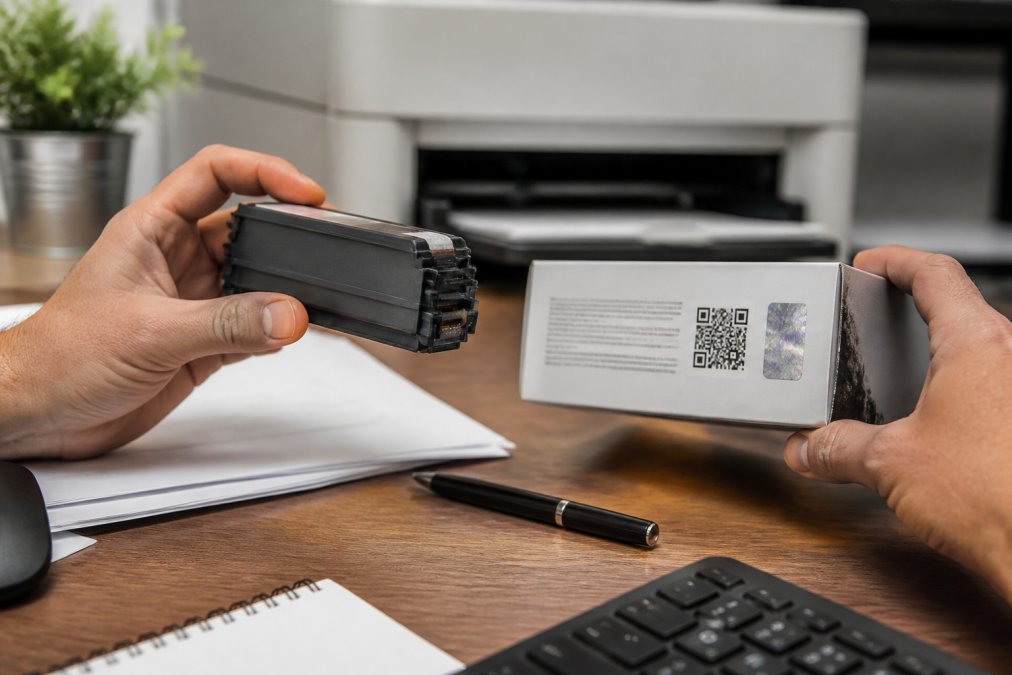
Tilt the box under a light. Genuine cartridges carry a holographic label that shifts colour or image as you move it. A flat, printed sticker that never changes is a red flag.
Look for these features on the label:
- A hologram that changes appearance when tilted
- A tamper-proof seal that's intact and unbroken
- Clean, sharp printing with no blur or misspelling
- A QR code or authentication number you can scan
Validate Serial Numbers and QR Codes Online
Every original cartridge has a unique serial number or authentication number. Scan the QR code or type the number into the manufacturer's validation portal. The site confirms whether it's genuine and whether it's been checked before.
Inspect Packaging Quality and Print Consistency
Counterfeiters get the big details right and the small ones wrong. Check the packaging fonts against the manufacturer's official style. Look for misaligned labels, faded colours, and thin cardboard.
Then check the cartridge itself:
Canon PFI-310 Original Plotter Ink →
- The plastic should feel solid, not flimsy
- The chip contacts should be clean and correctly placed
- The toner or ink should not leak or smell unusual
- The label on the cartridge should match the box
Risks of Counterfeit Printer Toner: What You're Really Saving
The savings on counterfeit toner are an illusion. A fake cartridge that costs a fraction of the real price often delivers a fraction of the pages, and it can take your printer down with it.
Here's what counterfeit supplies typically cause:
- Leaking toner that coats the inside of the machine
- Printhead clogging from ink that doesn't meet spec
- Hardware damage that costs more to fix than the cartridge saved
- Warranty voiding, since most manufacturers won't cover damage from non-genuine supplies
- Print quality issues like streaks, faded text, and wrong colours
Troubleshooting Printer Cartridge Recognition Issues
Your printer rejects a cartridge for a few common reasons. Sometimes it's a genuine cartridge that just needs a clean. Other times it's a fake that can't communicate with the machine.
Try these fixes in order:
- Reseat the cartridge. Pull it out and push it back until it clicks.
- Clean the chip contacts. Wipe the small metal contacts with a dry, lint-free cloth.
- Check for protective tape. New cartridges often ship with a strip that must be removed.
- Restart the printer. Power it off, wait 30 seconds, and turn it back on.
- Update the firmware. Printer makers release updates that improve cartridge detection.
Common Printer Error Codes and What They Mean
Most printers flash a code when they reject a cartridge. The exact code varies by brand, but the pattern is similar across models. The table below maps the message you see to the most likely cause and the first fix to try.
| Error Message / Code | What It Usually Means | First Fix |
|---|---|---|
| Cartridge not recognised | Chip not communicating with the printer | Clean contacts, reseat |
| Incompatible cartridge | Wrong model or region-locked cartridge | Confirm part number against your printer model |
| Toner low / empty (on a new cartridge) | Chip reporting incorrectly or not reset | Check chip, reseat, then test in another slot |
| Install error / cartridge error | Protective tape still on, or damaged chip | Remove tape, inspect chip for scratches |
| Communication error | Firmware mismatch after a printer update | Update firmware, then reseat |
| Supply problem / non-genuine supply | Printer detected a non-OEM chip | Verify the cartridge's authenticity before assuming a fault |
Why Some Printers Reject Genuine Cartridges
A genuine cartridge can be rejected for reasons that have nothing to do with counterfeiting:
- Region-locked cartridges.
- Firmware updates.
- Dirty or bent contacts. Dust, toner residue, or a bent pin on the printer's contact array will block communication even on a real cartridge.
- Expired or end-of-life chip.
Where to Buy Genuine Printer Supplies in Lebanon
The safest way to avoid counterfeits is to buy from a supplier who sources directly and stands behind the product. In Lebanon, fake stock moves through informal channels, so your supplier choice matters more than the brand on the box.
What to look for in any supplier:
- A physical business with a track record, not a page that appeared last month
- Clear original vs compatible labelling, so you know what you're buying
- A return policy for cartridges that fail
- Support you can actually reach when something goes wrong
Conclusion: Protect Your Printer and Your Budget
Counterfeits are a real problem in the Lebanese market, but they're beatable. Check the hologram, validate the serial number, and inspect the packaging. Those three habits will catch almost every fake before it reaches your printer.
Frequently Asked Questions
How can I tell if my printer ink is original?
Check three things: the holographic security label on the box, the serial number or authentication number printed on the cartridge, and the packaging quality. Genuine cartridges have sharp, consistent printing on the box, a tamper-proof seal, and a QR code you can scan through the manufacturer's validation portal. If the label looks misaligned, the fonts are blurry, or the seal is broken, treat it as suspect. In Lebanon, always buy from an authorized reseller with a physical presence.
What are the risks of using counterfeit printer cartridges?
Counterfeit toner and ink can leak inside your printer, clog the printhead, and cause hardware damage that voids your warranty. Print quality issues like streaking, faded output, and wrong color accuracy are common. You may also see lower print yield than the box claims. The short-term savings rarely cover the cost of a printer repair or replacement.
Why does my printer not recognize my new cartridge?
Printer recognition failures usually come from a dirty chip contact, an outdated firmware version, or a cartridge that doesn't match your model. Try cleaning the chip with a dry lint-free cloth, reseating the cartridge firmly, and checking for firmware updates. If the error persists, the cartridge may be counterfeit. Verify the serial number against the manufacturer's validation portal before assuming the printer is at fault.
What is the difference between OEM and compatible cartridges?
OEM (original equipment manufacturer) cartridges are made by the printer brand, like HP, Canon, or Brother. They guarantee compatibility and usually come with a warranty. Compatible cartridges are made by third parties and cost less, sometimes significantly less. A genuine HP 106A toner costs around $65, while a compatible version can be as low as $9.50 at Dabbous Mega Supplies. Compatibles work well when sourced from a reputable supplier, but quality varies by brand.


