

Last Updated: November 1, 2026
Quick Summary
A standing desk converter is worth it for most people working from a home desk, provided it fits the desk, the user, and their working habits. It keeps your current workstation, costs far less than a full standing desk, and lets you switch between sitting and standing during the day. Check its weight limit against your monitors and laptop before buying.
- Compare cost per working day, not just the purchase price, over the years you expect to use it.
- Measure desk depth, your height, and monitor size before buying a converter.
- Test stability at full height with your actual monitors and laptop loaded.
- Check whether your employer reimburses the converter before you purchase.
- Start with shorter standing blocks and build up, rather than standing for hours.
Table of Contents
- What a Standing Desk Converter Is and How It Differs From a Full Standing Desk
- Standing Desk Converter Pros and Cons for a Home Office
- Cost in LBP: Converter Versus a Full Standing Desk
- Fit Checks: Your Existing Desk, Your Height and Your Monitors
- Stability and Typing Experience: What to Expect Day to Day
- Using the 20/8-2 Rule Without Overdoing It
- Choosing the Best Standing Desk Converter for Your Home Office
- Frequently Asked Questions
Is a standing desk converter worth it for home office work? For most people working from a home desk, the answer is yes, but only if the converter fits the desk, the user, and the way they actually work. At Dabbous Mega Supplies, we sell a range of adjustable options. This guide gives you a straightforward way to decide.
What a Standing Desk Converter Is and How It Differs From a Full Standing Desk
A standing desk converter is a platform that sits on top of your existing desk and lifts your monitor and keyboard to a standing height. Your desk stays where it is.
The practical difference comes down to cost, space, and how much change you want. A converter keeps your current setup and costs far less. A full standing desk gives you a dedicated, larger work surface but requires more budget and room.
Standing Desk Converter Pros and Cons for a Home Office
Pros:
- Low cost compared with a full standing desk
- No need to move or rebuild your existing workstation
- Easy to switch between sitting and standing during the day
Cons:
- Less surface area for multiple monitors and accessories
- Some models wobble at full height, especially on lightweight desks
- Keyboard and monitor positions need careful adjustment to avoid strain
A common mistake is buying a converter without checking its weight limit against your monitors and laptop. Check the specification before you order.
Cost in LBP: Converter Versus a Full Standing Desk
Cost is where a converter usually wins, but only if you count the whole picture rather than the sticker price. A converter keeps your existing desk, so you avoid buying a new work surface.
Our current prices for adjustable options are listed on our product pages, so check the latest figures there before you buy. Our AIDATA LPD008 Laptop Mobile Station is priced at LBP 149,000 (listed in the computer riser category), while the AIDATA LAP005 Laptop Pad is listed at LBP 8,000.
Build a break-even figure you can actually use
Do not compare the converter price with the full-desk price in isolation. Compare cost per working day over the period you expect to keep the unit. A simple method:
- Estimate your work-from-home days per year. If you work from home three days a week, that is roughly 150 days a year.
- Decide how many years you expect the converter to last.
- Divide the converter price by (work-from-home days per year × expected years of use). That gives you a cost per working day.
- Do the same for a full standing desk, including delivery and any assembly charge.
The converter often produces the lower cost per working day, but the gap narrows if you would need to buy a monitor arm, a keyboard tray, or a wider platform to make the converter usable.
Total cost of ownership, not just purchase price
A converter is rarely a single purchase. Budget for:
- Accessories. A monitor arm or riser to reach eye level, a keyboard tray if the platform is too shallow, and cable management to stop the lift mechanism catching on wires.
- Assembly. Some units arrive flat-packed; check whether the price includes assembly or whether you need tools and time.
- Warranty and durability. Ask what the warranty covers; the lift mechanism is the part that fails first, and a warranty that excludes it is worth little.
A converter is worth it on cost when the price per working day is lower than a full desk over the same period and you do not need to spend the difference on accessories to make it usable. If accessories push the total close to a full desk, the full desk becomes the better long-term buy.
Employer reimbursement
If your employer reimburses home-office equipment, check the policy before you buy. Some employers cover a converter but not a full desk, or set a cap per item. A converter that is reimbursed is effectively free to you, which changes the decision entirely. Keep the receipt and the product specification, because reimbursement claims usually ask for both.
When the converter is not the cheaper option
A converter stops being the cheaper choice when:
- Your desk is too shallow or too lightweight to hold it safely, so you would need to replace the desk anyway.
- You need three or more monitors, which pushes you toward a larger, heavier, more expensive converter.
- You have mobility needs that make a manual lift impractical, so you need a powered unit whose price approaches a full desk.
In those cases, compare the converter plus accessories plus a replacement desk against a full standing desk before deciding.
The article's cost comparison comes down to the figures below, so a reader can see the per-day method and the listed prices at a glance.
| Item | Value | Note |
|---|---|---|
| AIDATA LPD008 Laptop Mobile Station | LBP 149,000 | Listed in the computer riser category |
| AIDATA LAP005 Laptop Pad | LBP 8,000 | Listed price |
| Work-from-home days per year | Roughly 150 | Based on three days a week |
| Cost per working day | Converter price ÷ (days × years) | Compare with full desk, including delivery and assembly |
| Full desk extras | Frame, top, delivery, assembly | Often add to the purchase price |
Fit Checks: Your Existing Desk, Your Height and Your Monitors
Before buying, measure three things: the depth of your desk, your own height, and the size of your monitors. A converter must leave enough depth for the keyboard and clearance for the monitor at standing height. Your monitor top should sit at or just below eye level when you stand.
AIDATA LPD008 LAPTOP MOBILE STATION →
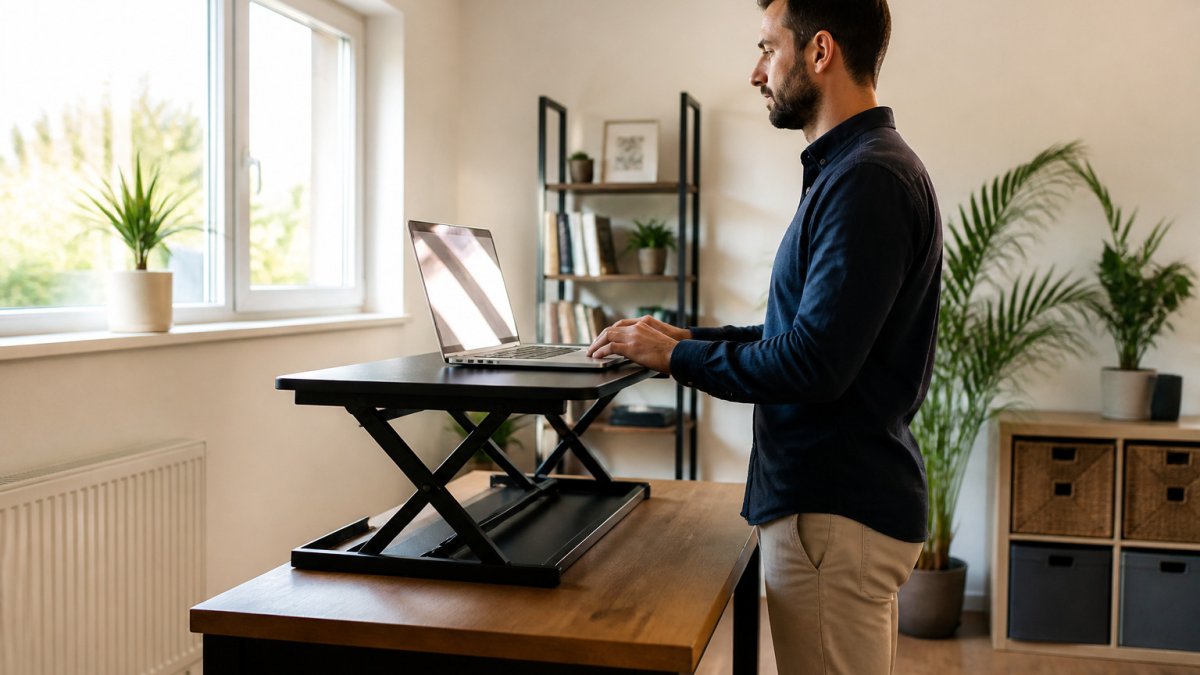
If you are unsure how the pieces fit together, our broader ergonomic office setup guide walks through how monitor and desk height work as a system. For raising a monitor to the right height, a monitor stand can help you reach eye level on a converter.
Stability and Typing Experience: What to Expect Day to Day
Stability is where many buyers are disappointed, and it is the hardest thing to judge from a product photo. A tall converter with a heavy monitor can sway when you type, which is distracting and tiring. Rather than rely on generic claims, test any unit against the same four checks before you commit.
A consistent test framework
Use the same sequence every time so you can compare units fairly:
- Wobble at full height. Raise the platform to its highest locked position. Place both hands on the front edge and push gently side to side, then front to back. A small amount of flex is normal; a platform that rocks visibly under light pressure will sway while you type.
- Keyboard bounce. Rest your hands on the keyboard as you would while typing and press a few keys firmly. Watch the front edge of the platform. If it dips or bounces, the lift mechanism or the desk underneath is flexing.
- Lifting effort. Raise and lower the unit through its full range. A gas-spring or powered lift should move smoothly without a hard jolt at the top. A manual lift that needs two hands and a firm push is tiring if you switch positions several times a day.
- Stability with your actual load. Test with the monitors and laptop you will really use, not an empty platform. Two monitors on a single arm concentrate weight at one point and are the most common cause of sway.
A converter that feels solid on a heavy, rigid desk can wobble badly on a lightweight desk or one with a thin top. Test the converter on the desk it will actually sit on, or check the combined weight limit of both.
What causes wobble
Wobble usually comes from three places: the lift mechanism itself, the base footprint, and the desk underneath. A narrow base concentrates load and rocks more easily. A platform that locks at discrete heights with a pin can develop play at the pin over time. A desk with a thin top or a trestle base flexes under a raised load. If you already know your desk is lightweight, choose a converter with a wider base and a locking mechanism that clamps rather than pins.
Typing feel and wrist position
Typing on a raised keyboard can strain your wrists if the mouse sits too low or too far away. On a converter, the keyboard and mouse sit on the same platform, so the mouse is usually at the correct height, but the platform depth decides whether you can keep your elbows at roughly 90 degrees. An ergonomic mouse pad with wrist support can make a noticeable difference in daily comfort, and a keyboard tray that slides out can restore the correct reach on a shallow platform.
Multi-monitor setups
Two monitors on a converter change the stability picture. Weight moves forward and up, which increases sway at full height. Check the converter's weight limit against the combined weight of both monitors plus arms, and prefer a unit whose platform extends behind the monitors rather than one where they overhang the front edge. If you run two monitors regularly, test the unit with both mounted before you decide.
Day-to-day expectations
A converter is generally stable enough for typing at standing height if the base is wide, the platform locks firmly, and the desk underneath is rigid. Expect a tall, narrow unit on a lightweight desk to be less rigid than a full standing desk. Set expectations accordingly: a converter is a platform on a desk, not a replacement frame, and it will always have slightly more flex than a full standing desk.
Using the 20/8-2 Rule Without Overdoing It
The 20/8-2 rule is a common guideline for sit-stand routines: roughly 20 minutes of standing for every 8 minutes of sitting, with short breaks of about 2 minutes to move. Treat it as a starting point rather than a fixed prescription. Standing for hours without breaks can cause leg and back fatigue just as sitting does.
Start with shorter standing blocks and build up over a few weeks. If you feel discomfort, sit down and adjust your setup before continuing.
Choosing the Best Standing Desk Converter for Your Home Office
The best converter for your home office depends on your desk, your equipment, and how often you will switch positions. For a laptop-based setup in a compact room, a mobile station with a lockable base is often the most practical choice; the AIDATA LPD008 Laptop Mobile Station offers height adjustment from 72cm to 94cm and a shelf that fits notebooks up to 17 inches.

Judge each option by three criteria: stability at full height, the weight it supports, and whether it fits your desk depth.
Frequently Asked Questions
Is a standing desk converter worth it for a home office?
It is worth it if you already own a sturdy desk, spend several hours a day at a computer, and want to alternate sitting and standing without replacing furniture. Compare the one-time cost in LBP against a full standing desk, and check that the converter's height range fits your body and monitor. If you rarely work from home or your desk is wobbly, a basic sitting setup with a good chair may serve you better.
How does a standing desk converter compare with a full standing desk?
A converter sits on top of your existing desk and raises your keyboard and monitor, usually at a lower cost and with less assembly. A full standing desk replaces the desk entirely, offers a larger, more stable work surface, and typically costs more. The converter suits people who want a quick, budget-friendly change; the full desk suits people planning a dedicated, long-term workstation.
What should you look for when buying a standing desk converter?
Check the height range so your keyboard can sit at elbow height when standing and sitting, the weight capacity for your laptop and monitors, and the footprint to make sure it fits your desk. Look at the lifting mechanism, whether it is manual or electric, and how stable it feels when you type.
How long should you stand at a standing desk?
The 20/8-2 rule is a common guideline: for every 30 minutes, stand for about 20 minutes, sit for about 8 minutes, and move or stretch for about 2 minutes. Use it as a starting point rather than a strict target, and adjust based on how your back, shoulders and feet feel. If you notice discomfort, shorten your standing periods and build up gradually.
Ready to upgrade your home office? Shop converters and ergonomic accessories at Dabbous Mega Supplies and set up a workspace that suits how you actually work.


